
विराम · vi·raam · pause, rest
Your screen won't pause for you. You can.
A mindful breath before the apps you choose, and gentle breaks for mind, body and eyes. On iPhone, iPad and Mac.

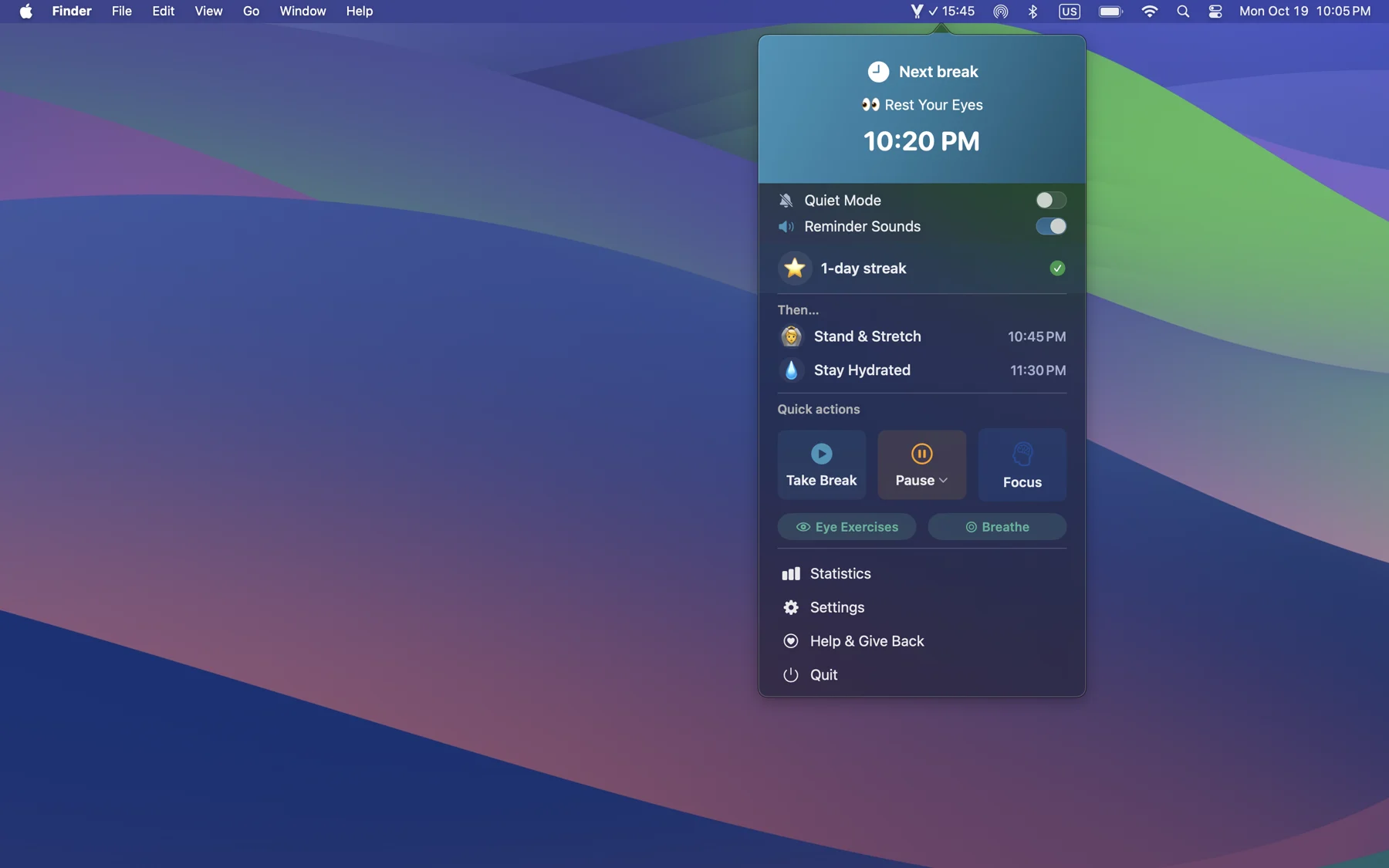
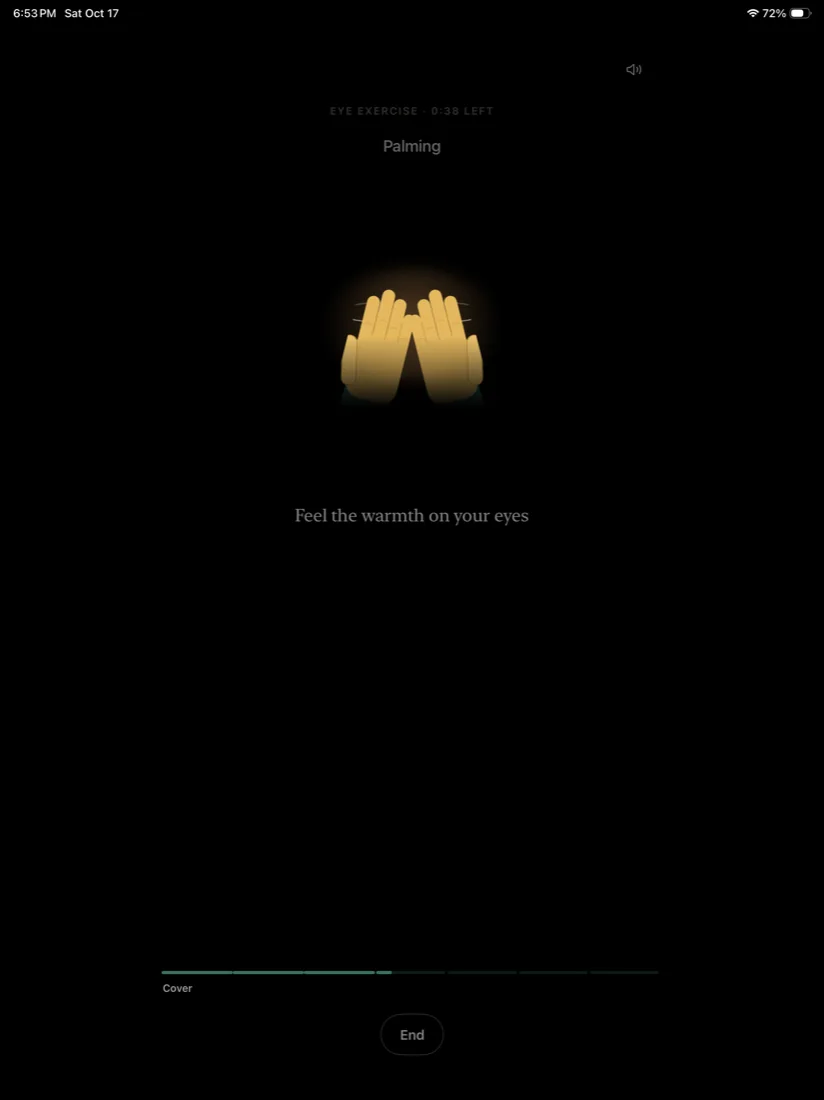
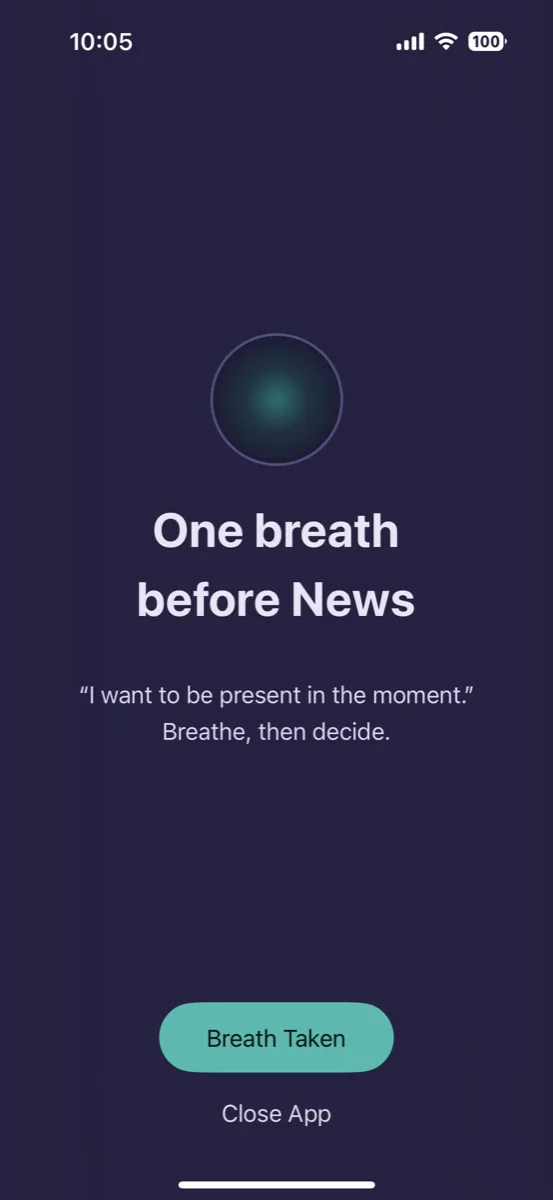
Two apps, each designed for its own device.
Bought separately. Start with one, or get both.
iPhone & iPad app New
Build a healthier relationship with your screen. Mindful pauses and short practices for mind, body and eyes.
7 days free on yearly · iOS & iPadOS 18+
Mac app Available now
Feel better through the workday. Timely breaks and sound-guided practices for eyes, body and mind.
14 days free, no card · macOS 14+
No account needed
For iPhone & iPad· New
Viraam for iPhone & iPad
Mindful pauses and practices, wherever you reach for your phone.
Separate purchase · from $2.99/mo · 7 days free on yearly · iOS & iPadOS 18+

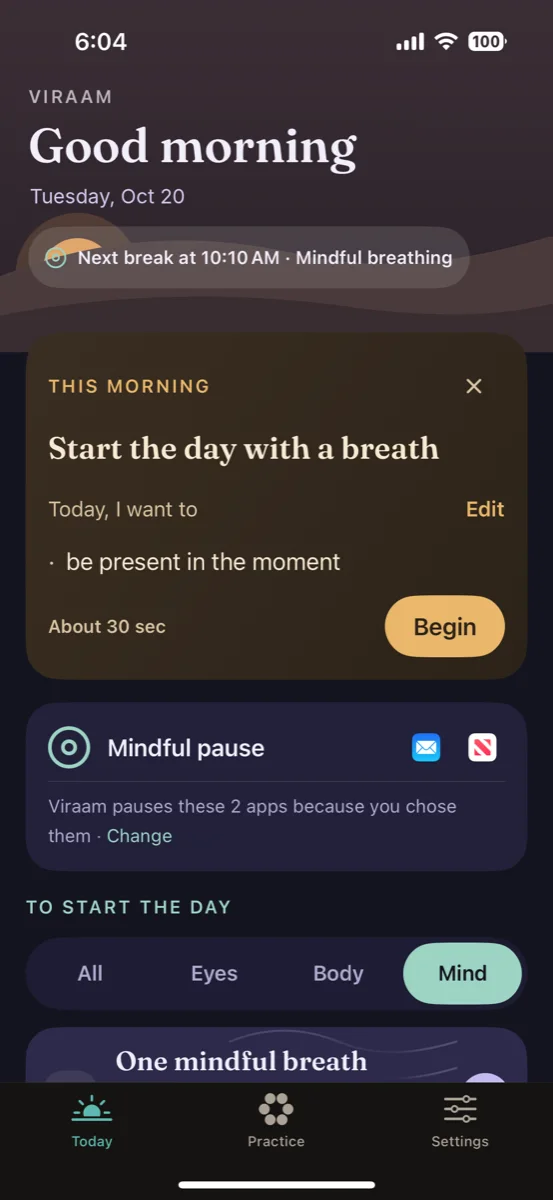
How a mindful pause works
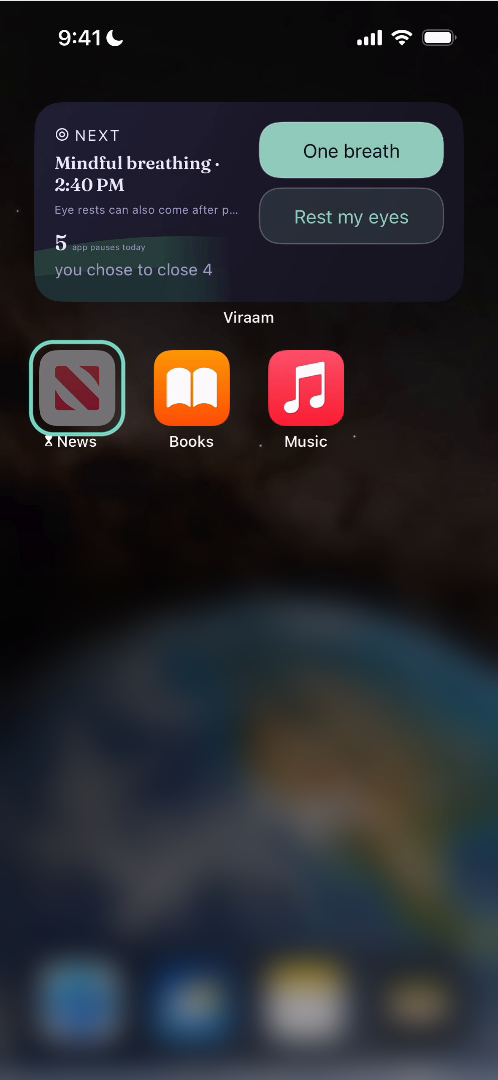
Open an app
Choose the apps that pull you in. Opening one starts a pause.
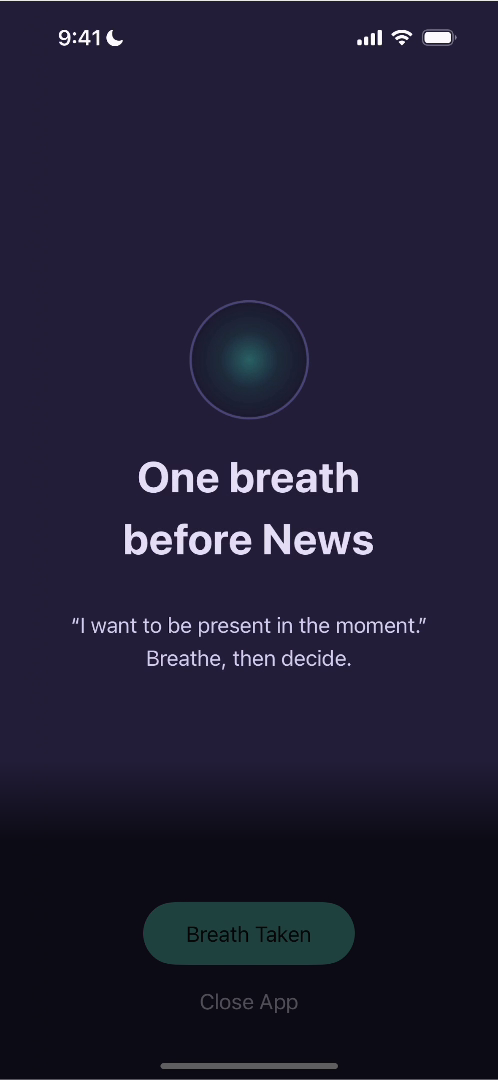
Take one breath
A short pause appears, with your own reason for slowing down.
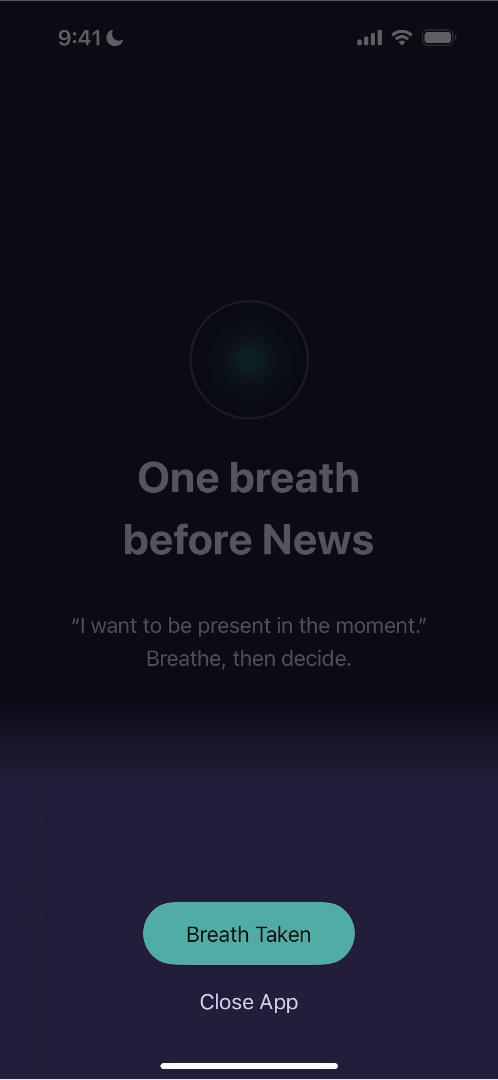
Then you decide
Breath Taken, or Close App. The choice is yours.


Mind
- A quiet count shows how many times you’ve paused today.
- Breathing paced by sound, with haptic cues you can feel on iPhone.
- Quiet meditation from 1 to 15 minutes, or one mindful breath whenever you need to reset.
Body
- Stand up and move, with step counting on iPhone that turns a pause into a short walk.
- Sit tall: gentle nudges to relax your shoulders.
- Drink water with a reminder through the day.
- A breath before a meal, so you notice your food.
Eyes
- A short guided rest paced by sound, so there's nothing to watch: blink, close your eyes, breathe in and out.
- Sound guides the pace, so there’s nothing to watch.
- Palming: a warm rest with your hands cupped over your eyes.
Set reminders separately for Mind, Body and Eyes, and decide how often each one comes. A daily limit keeps them from piling up, so Viraam fits around your day instead of interrupting it.
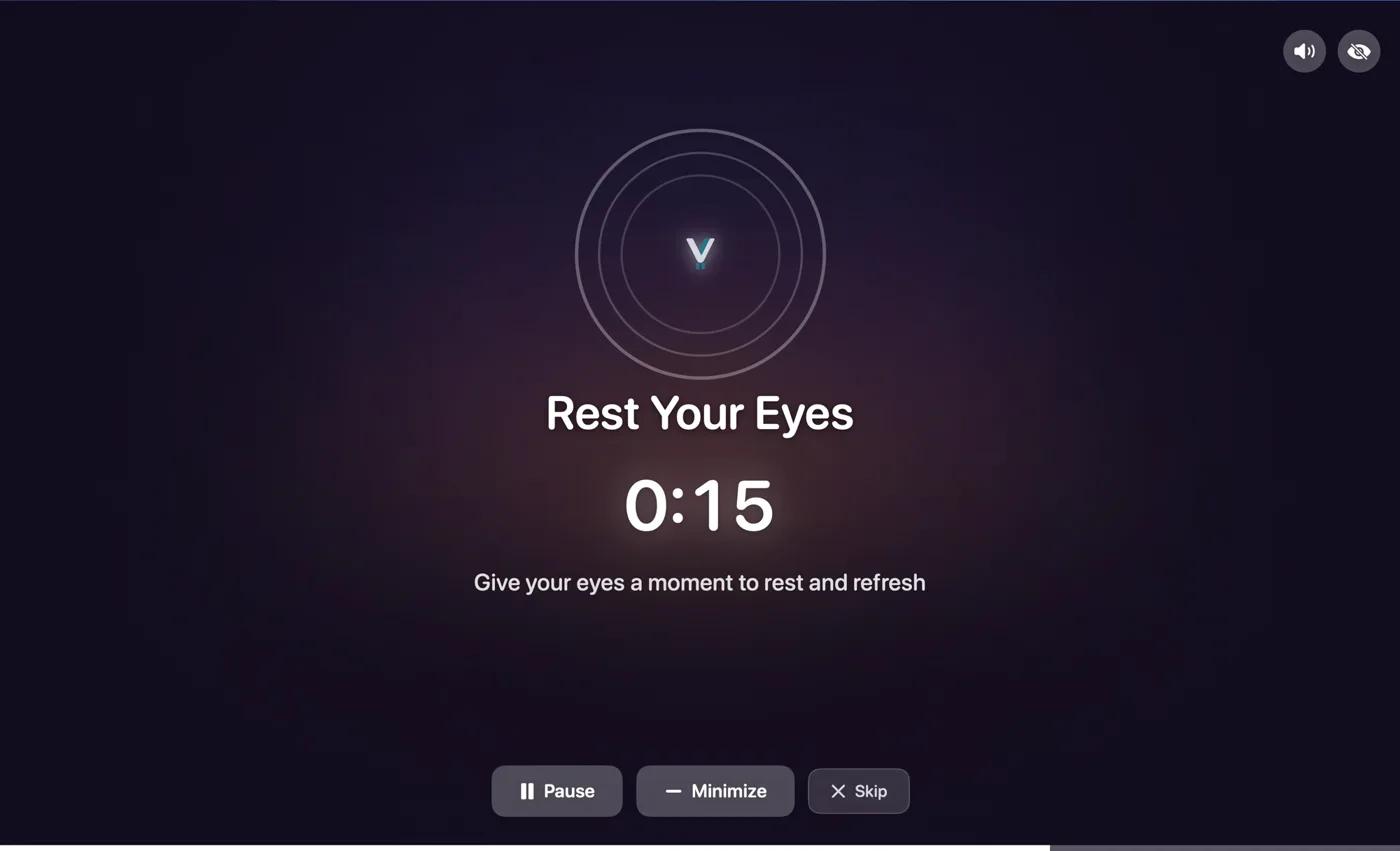
For Mac
Viraam for Mac
Designed around your workday at the desk.
Breaks wait out your meetings and deep focus, then guide you by sound, so you can rest with your eyes closed.
Separate purchase · from $2.99/mo · 14 days free, no card · macOS 14+
Eyes
- Audio-guided eye rest. Blink, close your eyes and palm, paced by sound instead of on-screen visuals.
- Rest Your Eyes reminders, timed to your schedule.
Body
- Stand & stretch, walk and water reminders, each with its own timing.
- Different sets for weekdays and days off.
Mind
- Mindful breathing guided by a rising and falling bell, trackpad taps, or both.
- Statistics for screen time, your longest unbroken stretch, and break time.
What people are saying
Five-star reviews from the Mac App Store
“Best break reminder app there is!”
“I tried about a dozen other apps before researching Viraam and I’m glad I kept searching too, because this app reminds me, not only to stand, but it’s so much more!”
“They answered most of my questions typically in the same day! After only about a week of use I opted to purchase their Lifetime License.”
“Love how it gently nudges me to stretch and rest my eyes without being annoying or breaking my focus.”
“It makes a lot of difference when you take those meaningful breaks to help your eyes to relax and mind to be self aware.”
“It reminds me to drink water, stretch, blink my eyes, and take short walks, all without being annoying.”
“Like the non-intrusive nudges; easy to follow. Am sure this will make a difference to overall well being in the long run.”
Everything in Viraam for Mac
A context-aware break reminder that helps you take the right break at the right time. Reminders wait out meetings, calls and full-screen video, and audio-guided eye exercises let you rest without looking at the screen.
Focus and timing Waits out meetings and focus, groups breaks, keeps to your hours, and stays out of the way
Respects Your Focus
Notices meetings and full-screen video, then holds breaks until you're done, or for 30 or 60 minutes. It asks once, then remembers.
Zoom · Teams · Meet · FaceTime · YouTube · and more
Smart Break Grouping
When breaks overlap, Viraam combines them into one, so you're interrupted less.
Only While You're Working
Set weekday and weekend hours. Outside them, Viraam stays quiet.
Focused Work Sessions
Pomodoro-style focus sessions, with calming breathing breaks built in.
Invisible Until You Need It
Launches instantly, light on battery, and feels like part of macOS. You'll forget it's running, until it gently reminds you to pause.
Eyes Audio-guided eye exercises and 20-20-20 reminders
Eye Exercises
Palming and blinking, paced by sound, so there's nothing to watch. About 70 seconds each.
Rest Your Eyes
Every 20 minutes, look away for 20 seconds. The 20-20-20 rule, timed for you.
Body Stand, stretch, water and walk reminders, each on its own timing
Stand & Stretch
Movement breaks, on their own timing.
Stay Hydrated
Water reminders through the day.
Walk
A longer break to get up and move.
Mind Breathing led by sound or trackpad taps, meditation and step-away breaks
Breathe With Your Eyes Closed
Thirty seconds noticing your breath, then paced breathing led by a bell, trackpad taps, or both. One, three or five minutes.
Meditate
Longer mindfulness breaks, on your schedule.
Take a Break
Step away for a coffee or a short rest.
Quick nudges Small cursor reminders to blink and sit up, separate from breaks
Blink Reminder
Prompts you to blink.
Posture Check
A gentle nudge to sit up straight.
Subtle, animated and never blocking. Set separately from your breaks.
Sleep Anchored to your bedtime, not a repeating interval
Wind Down Before Bed
Set your bedtime and how early to start winding down. Viraam reminds you, so your evening isn't carried over from work.
Progress Statistics, streaks and twelve months of trends
Statistics
See your screen time, your longest unbroken stretch, and your break time.
See Your Habits Build
Streaks, perfect days and a simple calendar of your breaks.
How breaks reach you Reminder styles, calm sounds, quiet and private by design, and your own setup
Subtle, Gentle or Immersive
A quiet animation, a small reminder, or a full-screen pause. Choose per break, and tap Done if you finish early.
Sounds That Calm, Not Startle
Each break has its own calm sound. Quiet Mode turns every reminder into a soft visual cue, and sounds have their own switch.
Present Confidently
Breaks hide during screen sharing and recordings. No tracking, no accounts: your data stays on your Mac.
Make It Yours
Choose your breaks, timing, colors, sounds and messages. Shortcuts and Focus Filters fit it to your day.
At a glance Platform, price, trial, what's collected
- Platform
- macOS 14.0 or later
- Category
- Digital wellness & eye care
- Includes
- 6 reminder types, 2 cursor nudges
- Free trial
- 14 days, no card required
- Price
- $2.99/mo · $19.99/yr · $49.99 once
- Data collected
- None — stays on your Mac Calendar is read-only, used on your Mac
- Works offline
- Yes — no account, no servers
- Available from
- Mac App Store
- Language
- English
- Developer
- Yogkul LLC

14-day free trial · From $2.99/mo · macOS 14+
Simple pricing.
Try free for 14 days — no credit card needed. Then choose your plan.
Independent review of Viraam for Mac
“I evaluated a handful of the popular Mac App Store options for this. I landed on Viraam.”
Monthly
Flexible, cancel anytime
$2.99
per month
Yearly
Save 44% vs monthly
$19.99
per year · $1.67/mo
Lifetime
Pay once, own forever
$49.99
one-time · every update included
Monthly
Flexible, cancel anytime
$2.99
per month
Yearly
Save 44% vs monthly · 7 days free
$19.99
per year
Lifetime
Pay once, own forever
$39.99
one-time · every update included
Every plan includes every feature.
Every iPhone & iPad plan includes everything:
A mindful pause before your apps
Breathing by sound, haptics on iPhone
Eye rest guided by sound, with palming
Movement, with steps on iPhone
Hydration, posture & mindful eating
Morning intention, evening wind-down
A daily limit — no pile-ups
Quiet meditation & one mindful breath
Your week, from Screen Time
Widgets & Control Center
7-day free trial on the yearly plan
Frequently Asked Questions
Everything you need to know about Viraam
Apart from the first four, these answers are about Viraam for Mac. For the iPhone & iPad app, see iPhone & iPad support.
How do I find the real Viraam on the App Store?
Look for Yogkul LLC as the developer, or use the links on this site. On Mac it's “Viraam: Screen Break Reminder”; on iPhone and iPad it's “Viraam: Mindful Screen Pauses”.
Are the Mac and iPhone apps one purchase?
No. They're separate apps, each bought on its own, and they don't sync or share data. They share some practices, like guided breathing and eye rest, but each is built for its device: Viraam for Mac reminds you to take breaks while you work, and Viraam for iPhone & iPad adds a mindful pause before the apps you choose. Use one, or both.
What is Viraam?
Viraam is a mindful-pause app for iPhone, iPad and Mac. On iPhone and iPad it adds a breath before the apps you choose, plus short practices for mind, body and eyes. On Mac it gives well-timed breaks that wait out meetings and focus, with sound-guided eye rest and breathing.
How much does Viraam cost?
Viraam for Mac: $2.99/month, $19.99/year, or $49.99 lifetime, with a 14-day free trial (no card needed). Viraam for iPhone & iPad: $2.99/month, $19.99/year with a 7-day free trial, or $39.99 lifetime (Early Supporter). They're separate apps, bought separately.
How do I subscribe to Viraam?
Two ways: tap Subscribe from within the app and choose your plan — that's the easiest. Or download from the Mac App Store and subscribe after your 14-day trial. All payments are processed securely by Apple.
Will Viraam interrupt me during meetings or videos?
By default, no — Viraam pauses breaks when it detects a video call or full-screen video. The first time it happens it asks how you'd like that handled: pause until it closes (the default), pause for 30 minutes, pause for 60 minutes on a call or 2 hours for video, or tap Keep breaks on to carry on as normal. Tick Remember my choice and it's automatic from then on. Cursor nudges are independent and keep their own settings.
Is my data private?
Yes. Your data stays on your Mac. Viraam doesn't send any analytics, telemetry, or usage data to external servers. We don't track you, period.
Screen Sharing Privacy: Break reminders are automatically excluded from screenshots, screen recordings, and screen sharing. When you're presenting on Zoom or sharing your screen, attendees won't see your break notifications - your wellness stays private.
What is the refund policy?
All purchases are processed through the Mac App Store, and refunds are handled by Apple. If you're not satisfied, you can request a refund at reportaproblem.apple.com.
More Mac questions
How easy is it to set up Viraam?
Download, open, choose a template — Minimal, Balanced, or Frequent — and Viraam is by your side. Your wellness companion, ready in under 30 seconds. Fine-tune timings, styles, and break types anytime.
What are Viraam's notification styles?
Viraam has three. Subtle shows a quiet animation near the menu bar with nothing to dismiss. Gentle shows a small toast with a wellness message or exercise suggestion. Immersive takes over the screen for a full pause with calming backdrops and your choice of sound. You can switch between them at any time, and Focus Filters can apply a different style per macOS Focus mode.
Can I use Viraam silently in a café or shared office?
Yes, using two controls. Quiet Mode switches every break reminder to a soft visual cue with one tap — no full-screen takeover — so nothing takes over your screen in a café, office or shared space. Sound is handled separately: break chimes keep playing until you switch off Reminder Sounds. For a fully silent setup, use both. They're deliberately independent, so you can also keep the chimes while only the visuals change.
Does Viraam access my calendar?
Only if you enable calendar integration for Focused Work Sessions (Pomodoro). Viraam requests read-only access to your calendar events to display what task you're working on during focus sessions. This data is processed locally on your Mac and never sent to our servers.
Can I customize the break timings?
Yes. Every break type can be toggled on or off with its own interval, from minutes to hours. You can also choose the notification style — Subtle, Gentle, or Immersive — set your accent color, pick break sounds or silence them, and use Working Hours so reminders only fire while you're actually working.
How does Smart Break Grouping work?
Viraam intelligently combines overlapping breaks into a single pause. Instead of multiple interruptions, you get one grouped break covering everything you need. Fewer pings, same wellness coverage.
Does Viraam track my progress?
Yes. Statistics show your screen time, longest unbroken stretch and break time, and a habit calendar shows streaks and perfect days, with 12-month trends.
What macOS version do I need?
Viraam requires macOS 14.0 (Sonoma) or later. The app is a lightweight native Swift application and works on both Apple Silicon and Intel Macs. iPhone and iPad need iOS or iPadOS 18 or later.
Does Viraam work with multiple monitors?
Yes. Viraam detects your multi-monitor setup and displays break reminders on your primary display. Cursor-following nudges track your cursor across all connected displays seamlessly.
What are audio-guided eye exercises?
Palming and blinking. Each begins with brief instructions, then soft sound cues guide you through the rest. Each takes about 70 seconds, a moment of calm in your day.
What can I automate with Shortcuts?
Viraam includes 8 Shortcuts actions — start or skip a break, toggle pause, switch plans, and more. Build your own automations or trigger wellness routines from other apps and widgets.
What are Focus Filters?
Different Focus modes, different wellness settings. Choose between pause, subtle, gentle, or immersive notification styles — and optionally enable blink and posture nudges. Viraam adapts automatically when you switch Focus modes.
Still have questions?
hello@viraam.app